
Updated: Jun 6, 2025
ℹ️ - Spirit of the North 2 Photo Mode Review
Developer: Infuse Studio
Publisher: Silver Lining Interactive
Platform: PS4, PS5
Initial Release: 18th February 2022
Reviewed on PS5 with a digital copy provided by Silver Lining Interactive
Freely roaming across the stunning Northern Isles and investigating ancient ruins as a customisably furry magic fox: what's not to love? Well, perhaps the insidious shaman who has corrupted the other legendary guardian animals I guess, but even that has its upside.
The resulting boss encounters bring an added intensity to the otherwise tranquil environmental puzzles, making Spirit of the North 2 a much deeper gameplay experience than its predecessor. A full skill tree, magic-granting runes, and even the presence of a raven companion and raccoon merchants are testament to that in a game that has been upgraded in pretty much every area.

That includes the visuals too with Unreal Engine 5 making the fantastic art style even more beautiful across all 6 of the varied biomes. It's great then to see Infuse Studio bringing back their bespoke photo mode to let you capture moments of your journey through the spirit realm. And guess what, that's had a little upgrade too, although some parts are perhaps still "under construction".
Key Photo Mode Features:
Manual focus & aperture control
Bloom & Flare
Texture detail / Clarity

The Photo Mode:
There are a few flaws here, that has to be said, but I'm actually glad to see Spirit of the North 2 sticking with an original photo mode when it may have been tempting to drop in a readymade blueprint from the Unreal Marketplace. While simple, the bespoke setup better shares the soul of the game.
Before you think I'm getting all metaphysical about a photo mode, it's just the little things. Like how the minimalist UI with no descriptions echoes the game's dialogue-free storytelling, or how features like bloom are tailored to work with the magical elements. It's simply nice to see a game and photo mode in harmony.

The brightness option that was present when I started writing this review has since disappeared...
Default access is via the D-Pad, although this can be freely customised to any button if you prefer. I've actually set mine to L1 for easier access while still holding the LS to capture walking animations. Once in the photo mode, you have free camera control across a reasonably large range with truck & dolly on the LS and pan & tilt on the RS. Thankfully the previously inverted x-axis has now gone, making this a much more intuitive experience.

There's also vertical craning with L1 / R1, while the L2 / R2 triggers handle the field of view zoom – something that can also be done via a duplicate slider on the UI. Compositional freedom should be ok then, but it is somewhat held back by the minimal camera roll that affords just 25° in each direction. It's a seemingly unnecessary limitation – especially given that the previous game had 180° – and means that portrait-oriented shots are out of the question for now.
It's also odd to see that the ability to swap between fox fur types from within the photo mode has been removed too. The corresponding setting just hides your fox this time around, that's despite there being 25 different fur patterns to unlock.

In fact, disappearing features is a bit of a running theme here as the Brightness option that was present when I started writing this review has since disappeared in the launch version. Admittedly, it wasn't working properly before and will more than likely return once fixed in a future update, but it's now just left as a ghost option that sits invisibly below (and is sometimes affected by) the Aperture slider.
This is not a totally broken photo mode though, far from it, and better news comes in the form of an added manual focus function. Like all settings here, this is a non-numerical slider, and this one brings up a magenta wall and viewfinder reticle to help position the camera focus.

The wall moves back and forth through the scene to visualise exactly where the plane of focus lies. It's a perfectly easy way to get the focus right every time and is paired with a basic aperture setting to control the depth of field.
A shallow DoF with blurry background can be achieved by moving the slider to the left, just be sure to combine it with a narrower field of view for a stronger effect. With that done, the transitions between the defocused blur and the areas in sharp focus are nice and smooth, and there's a pleasing circular bokeh on distant light sources.

Obviously, that comes in handy with some of the glowing magical effects, and a couple of other options only enhance those further. The first one at least, does so deliberately by exaggerating the bloom and lens flare. This is perfect for the game and gives a soft spread to the glow from mystical illuminations.
Separated from the bloom option by a single vignette opacity slider, there's another option that also seems to cause the highlights to glow more across the image and I can't help but thinking that this one is an accidental by-product. That's because the UI icon of a pixel grid implies some sort of texture detail or clarity enhancement. It does indeed do that, with the fox's fur becoming noticeably more defined, but those glowing highlights definitely come along for the ride too.

Far from perfect then, and presumably due a fix or two in the future, but the flaws of this photo mode somehow don't spoil the enjoyment. There remains something magical about shooting this fox – in a good way of course.


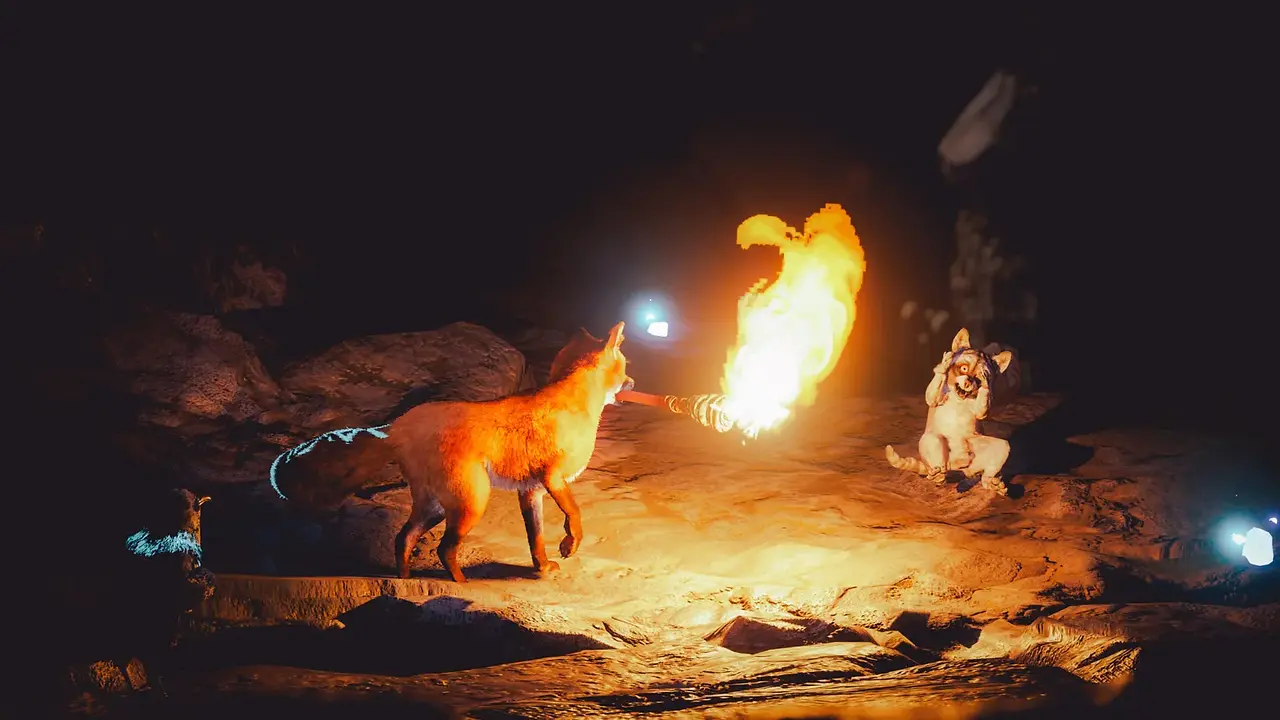
It's worth getting to know some of the movement and idle animations...
Photographic Opportunities:
Much like the first game, Spirit of the North 2 is another opportunity to photograph an artistic and adorable fox in some extremely beautiful locations, only this time there is more of just about everything. The tactile brush strokes of fur and bushy tail come in 25 colour variations, while extensive customisation options mean that you can tweak everything from snout length to eye colour for your own personal vulpine.

You're not alone this time either, with a guiding raven being a virtually constant companion and a whole fox island bringing a few other playmates along at times. It's certainly worth getting to know some of the movement and idle animations too. A curious paw, fearful expression, or being curled up asleep, these can really add character to the furry subjects.
Oh, and be aware that the tail, no matter how bushy, will continue to move slowly while the scene is frozen in the photo mode. This could potentially be a problem, but sometimes a little wait can actually lead to better results.

As a location, the fox island is dwarfed by the huge open world that is riddled with ancient ruins and underground caverns everywhere you go. On the surface, the space is used to great effect and transitions beautifully between the 6 distinct biomes. Whether it is black sands of volcanic beaches, snowy mountains, or lush green woodlands, this is a stunning set of locations to roam through on 4 legs and the variable time of day and weather conditions make it constantly rewarding.


And don't forget those boss encounters. They are each a one-off set piece and can be tricky to work with without getting flung around, but they add unique spectacles and a dramatic change of pace. In any case, the art style alone makes this a game that is well worth aiming a virtual camera at.


Subscribe to the regular newsletter for all the latest features from TheFourthFocus.com
Verdict:
Spirit of the North 2 has lots to offer with that wonderful art style, characterful fox, and a photo mode that's simple and yet in-tune with the overall experience. It's now easier to use and more optically accomplished thanks to an added focus function, but is currently let down by a few restricted, misbehaving, or even missing features. If Infuse Studio can solve those, this will be great way to get your fox fix!

Full Feature Set:
Access & Control
Photo Mode Access: D-Pad 🠕
Camera Movement: Free camera with bounding area
Horizontal Pan: 360°
Vertical Tilt: 180°
Roll: ± 25°
Menu UI
Fox Visibility: Show / Hide
Field of View: Non-numerical slider
Focus Distance: Visualised plane
Aperture: Non-numerical slider
Brightness: Non-numerical slider (currently disabled)
Bloom / Flare: Non-numerical slider
Vignette: Non-numerical slider
Texture / Clarity: Non-numerical slider
Roll: Non-numerical slider (-25° to +25°)


I remember getting lost in a game's photo mode for hours, completely forgetting the stress of deadlines. It was a strange kind of calm framing shots, adjusting light, just being present. As a PhD student who works part-time at Last-Minute Assignments, I still use gaming as a way to decompress. I was so overwhelmed I'd search for affordable assignment Help just to buy back an evening for it. This post captures that quiet escape well. Cheers.
Die Möglichkeit, mit der neuen Foto-Modus in Spirit of the North 2 den magischen Fuchs in so wunderschönen Umgebungen festzuhalten, ist wirklich faszinierend. Besonders die manuelle Fokussierung und die individuelle Anpassung der Blende bieten tolle kreative Möglichkeiten. Obwohl einige Funktionen wie der vorherige Helligkeitsregler noch fehlen, spiegelt die minimalistischer Benutzeroberfläche wirklich die Atmosphäre des Spiels wider. Ich finde es spannend, wie man mit der Fotografie in Spielen Emotionen und Geschichten einfangen kann, was mich auch an die Erlebnisse aus Apostate Verity erinnert, wo visuelle Gestaltung ebenfalls eine große Rolle spielt. Weitere Informationen dazu gibt es hier: Apostate Verity.
Die Möglichkeit, den Fokus und die Blende manuell zu steuern, klingt wirklich spannend! Gerade in einem so visuell beeindruckenden Spiel wie Spirit of the North 2 kann das den Unterschied ausmachen, um die magischen Momente mit dem Fuchs festzuhalten. Ich finde es auch toll, dass die Entwickler einen eigenen Ansatz für den Fotomodus gewählt haben, anstatt ein Standard-Template zu verwenden. Das zeigt, dass sie die Essenz des Spiels wirklich verstanden haben. Für Fans von ästhetischen Spielen könnte auch die Tomodachi Life Seite Tomodachi Life interessant sein, wo man die verschiedenen Persönlichkeiten und ihre Geschichten entdecken kann.
Mình có lần lướt đọc mấy trao đổi trên mạng شيخ روحاني thì thấy nhắc nên cũng tò mò mở ra xem thử cho biết. Mình không tìm hiểu sâu جلب الحبيب chỉ xem qua trong thời gian ngắn để quan sát bố cục جلب الحبيب cách sắp xếp شيخ روحاني các mục và trình bày nội شيخ روحاني dung tổng thể. Cảm giác là các phần được trình bày khá gọn, các Berlinintim mục rõ ràng nên đọc lướt cũng không bị rối Berlinintim với mình như شيخ روحاني vậy là đủ để nắm tin cơ bản rồi. جلب الحبيب
😍
Informative article! northern state medical university is often recognized for its strong academic programs and research opportunities. It's helpful to learn more about what the university offers to international students.